
Give your staff the tools they need to do their jobs without sharing your passwords or exposing sensitive business information. Keep your gym running smoothly and securely.
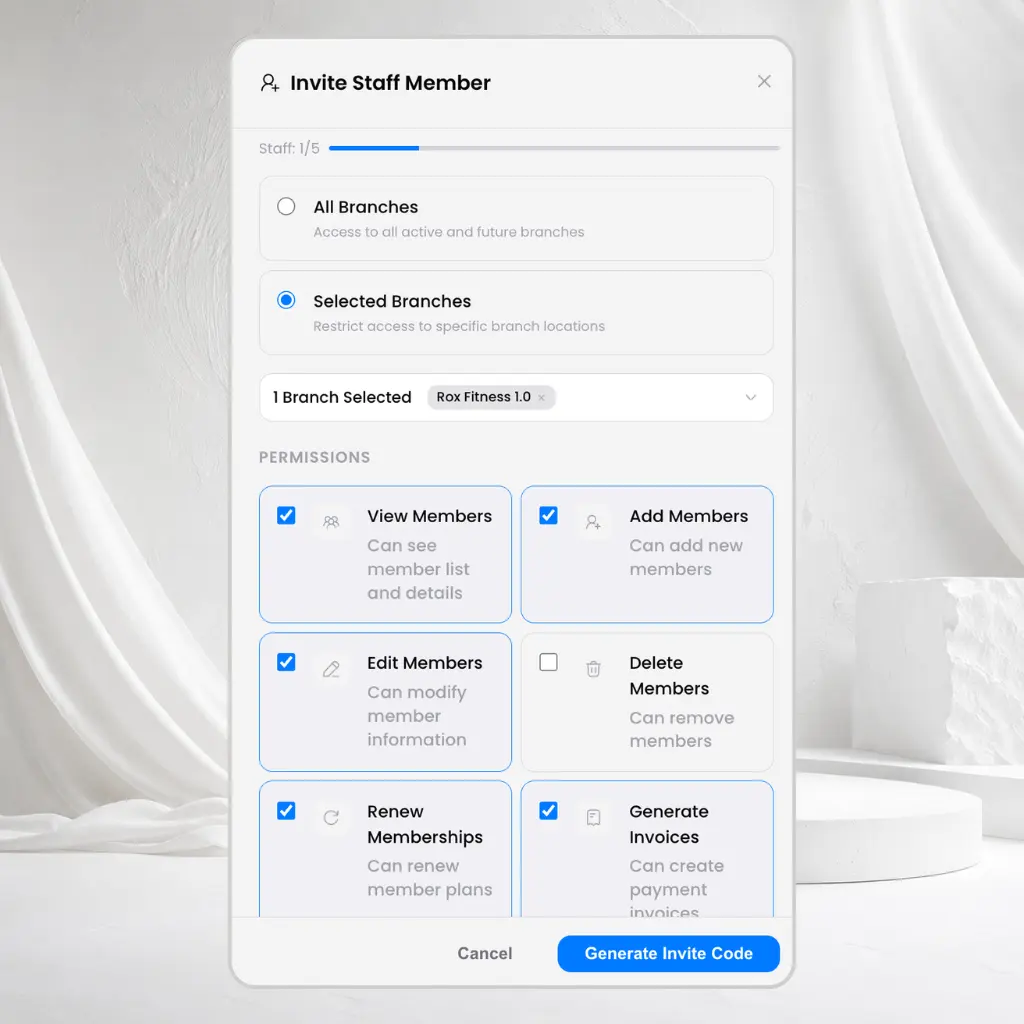
Run your gym as a team without losing control of your business.
Managing a successful gym requires teamwork. But sharing a single owner password puts your revenue reports and member lists at risk. GymScaleUp lets you give every employee their own login. You choose exactly what they can see and do, helping you delegate work confidently and protect your business.
Keep your business information protected while empowering your team.
Individual Staff Accounts
Every staff member gets their own login. No more sharing passwords.
Custom Permissions
Decide exactly what each employee can view or edit, keeping sensitive information hidden.
Branch Access
Employees only see the branches they work in, keeping information organized across locations.
Activity History
Know exactly who updated a member, created an invoice, or changed important information.
Setting up your team takes just a few minutes.
Invite Your Team
Invite a staff member using their email address.
Assign Access
Choose their role and assign the specific branches they can access.
Start Working
They sign in using their own account and start working with only the permissions you have assigned.
Advanced features designed to keep you in complete control.
Choose Exactly What Staff Can Do
Receptionists, trainers, and managers have different responsibilities, and their access should reflect that.
- Separate login for every single employee
- Receptionists, trainers, and managers can have different permissions
- No password sharing required
- Manage your whole team from one easy dashboard
Branch-Based Permissions
If you run multiple gyms, you can choose exactly which branch a staff member has access to.
- Limit staff so they only see the branches they work in
- Prevent accidental changes across different gym locations
- Easy permission updates anytime
- Disable access instantly when someone leaves
See how owners confidently delegate work to their team.
Hiding Revenue Reports
A receptionist needs to check in members and create invoices, but should not see revenue reports.
GymScaleUp lets the owner hide financial information while still allowing daily front desk work.
Managing Multiple Locations
A trainer only works at the Salt Lake branch.
They only see members, schedules, and data from that branch, keeping everything organized.
Handling Resignations
A staff member resigns.
The owner disables their account immediately without affecting anyone else.
Promoting Employees
A manager is promoted.
The owner updates their permissions in seconds without creating a new account.
Got questions about this feature? We've got answers.
Give every staff member the access they need while keeping your business information protected. Manage your team with confidence using GymScaleUp.